Hey there, friend. Let’s be real—preparing for the AZ-500 certification can feel overwhelming when you’re just starting out. You’re juggling work, life, and now you want to become an Azure Security Engineer. The good news? Thousands of beginners have walked this path and passed, and so can you. This guide isn’t just another technical deep-dive; it’s your personal mentor’s playbook, packed with practical tips, money-saving hacks, real lab scenarios, and insider secrets that’ll get you across the finish line with confidence.
Why AZ-500 Matters (And Yes, It’s Worth Your Time)
Before we jump into study strategies, let’s talk about why you’re doing this. The AZ-500 certification validates your skills in securing Microsoft Azure environments—a skill set that’s in massive demand right now. Organizations worldwide are moving workloads to the cloud, and they desperately need security pros who can protect those environments. That’s where you come in.
Here’s what matters for beginners like you:
The certification proves you can configure identity systems, defend cloud infrastructure, respond to security incidents, and protect data—all real-world problems companies face daily. When you pass this exam, you’re not just getting a badge; you’re proving you can solve actual security challenges in production environments.
As for the payoff? Azure Security Engineers start around $90K–$115K with no experience, jump to $115K–$145K after 3–5 years, and reach $125K–$165K+ as you climb the ladder. In the US specifically, the average sits around $152,773 per year. If you’re in the UK, you’re looking at £40,000–£70,000, with London positions pushing toward £60,000. Not bad for building a skill that companies are willing to pay top dollar for, right?
The Honest Truth About Your Starting Point
Look, if you’re coming to AZ-500 without much Azure experience, that’s totally fine—this guide is built for you. However, here’s what I’d recommend checking first: Do you understand basic networking concepts (subnets, firewalls, DNS)? Have you heard of identity and access management? Do you know what encryption is beyond the buzzword?
If you answered yes to these, great—you’ve got a solid foundation. If not, don’t panic. Spend Week 0 (yes, Week 0) watching YouTube primers on cloud fundamentals. Microsoft Learn has a free “Cloud Concepts” module; knock it out over a weekend. This isn’t cheating; it’s being smart about your prep.
For beginners specifically, expect 6-8 weeks of solid study if you’re working full-time. If you can dedicate more time (say, you took PTO), 4-6 weeks works. The key is consistency, not intensity—we’ll talk strategy in a moment.
Your 6-Week Study Plan: Week by Week
I’m going to layout the exact study schedule that works for beginners. This isn’t theoretical; it’s what successful candidates follow.
Week 1: Lay the Foundation and Orient Yourself
Your goal this week: Understand the exam and build your baseline.
Start by reading the official AZ-500 Exam Skills Outline on Microsoft’s website—it’s literally the blueprint for what you’ll be tested on. Spend 1-2 hours here. Next, head to Microsoft Learn and browse the AZ-500 learning path. Don’t dive deep yet; just get a feel for topics: identity and access (30-35% of the exam), platform protection (15-20%), security operations (25-30%), data and applications security (20-25%), and troubleshooting (10-15%).
Actionable tasks:
- Schedule your exam date 6 weeks out—this creates urgency and locks you in
- Take the free Microsoft Learn Practice Assessment to see where you stand
- Start a simple spreadsheet tracking your weak areas (we’ll hit these hard later)
Time investment: 8-10 hours this week. Don’t burn out; you’re just getting oriented.
Week 2: Identity and Access Management Deep Dive
Here’s the insider secret: 30% of the exam focuses on identity. Master this, and you’re already ahead of the curve.
This week, your focus is Microsoft Entra ID (formerly Azure AD). Watch John Savill’s AZ-500 video series on YouTube—his identity module is a goldmine for beginners. Then head to Microsoft Learn and work through these modules in order:
- “Microsoft Entra ID Fundamentals”
- “Secure identity and access with Azure AD”
- “Implement role-based access control (RBAC)”
After each module, pause and write a one-paragraph summary—this forces your brain to actually process the info rather than zone out.
Hands-on lab this week:
Sign up for a free Azure account (you get $200 credit for your first month—enough for labs). In your test tenant, create a new user, assign them Owner role, then remove it. Do this five times until it feels automatic. Create a conditional access policy blocking access from unknown locations. These aren’t fancy, but they’re what you’ll see on exam day.
Time investment: 10-12 hours. Get through theory and practice at least two lab scenarios.
Week 3: Network and Platform Protection
This week is about NSGs (Network Security Groups), firewalls, and keeping bad actors out.
Microsoft Learn modules to hit:
- “Configure Azure Firewall”
- “Network security groups (NSGs)”
- “Azure DDoS Protection”
Here’s a beginner trap I want you to avoid: memorizing every CLI command. Instead, focus on understanding why you’d use NSG priority 100 vs. 200, or when to choose Azure Firewall over a Network Virtual Appliance. The “why” sticks better than facts.
Hands-on lab:
Create a virtual network, split it into a web subnet and a database subnet. Add an NSG to each. Write a rule allowing HTTP to the web subnet but blocking everything to the database subnet from the internet. Then verify it works by trying to SSH into a VM in the database subnet—fail is expected, and that’s learning.
Time investment: 10-12 hours.
Week 4: Security Operations and Threat Detection
Now things get exciting—this is where you learn to hunt attackers.
Focus on:
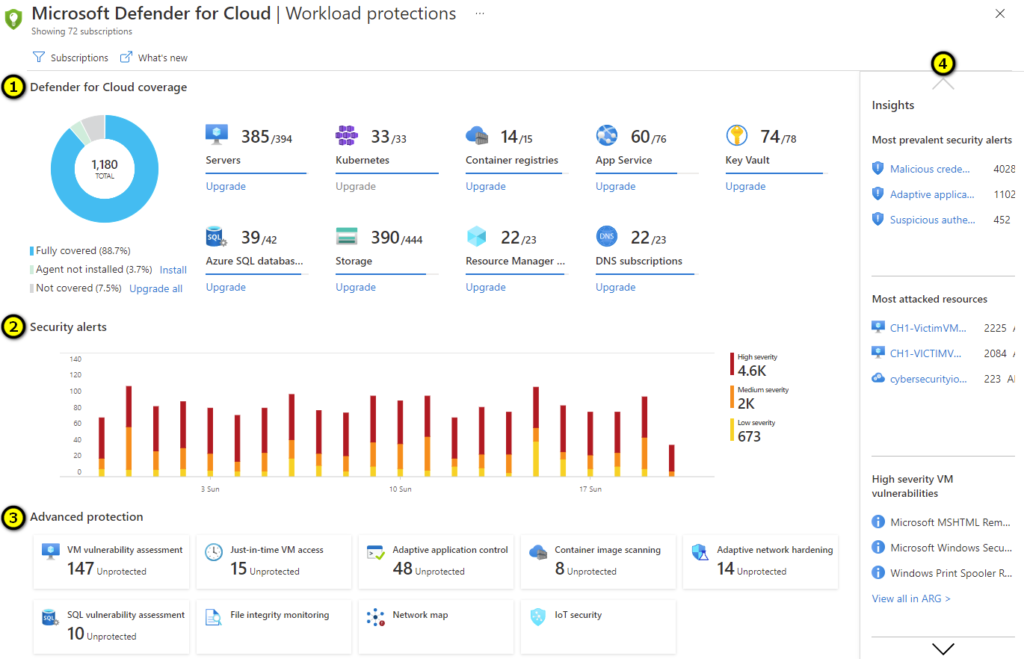
- Microsoft Defender for Cloud (formerly Security Center)
- Azure Sentinel (log analytics and threat detection)
- Security Information and Event Management (SIEM) basics
This is a bigger week because Sentinel can feel intimidating. YouTube is your friend here; Pluralsight has excellent Sentinel walkthroughs. Microsoft Learn has hands-on labs you can run for free.
Hands-on lab (the game-changer):
Deploy a Sentinel workspace, ingest some sample logs, and write a basic KQL (Kusto Query Language) query to hunt for failed login attempts. Yes, KQL looks scary if you’ve never coded. But here’s the secret: you don’t need to be a programmer. Start with templates Microsoft provides, tweak them, and run them. After three attempts, it clicks.
Time investment: 12-15 hours. This week is dense; don’t rush.
Week 5: Data Protection and Integration
Halfway through the back-half of the exam: encryption, compliance, and data governance.
Microsoft Learn modules:
- “Implement data protection in Azure SQL Database”
- “Azure Key Vault for key management”
- “Information Protection and DLP policies”
Hands-on lab:
Create an Azure Key Vault, generate a key, and use it to encrypt a storage account. It’s a small lab, but the mental model—asymmetric encryption protecting your data—is huge.
Time investment: 10-12 hours.
Week 6: Review, Practice Tests, and Confidence Building
Take full-length practice exams from Whizlabs or Tutorials Dojo (budget $25-40 for access). Don’t aim for perfection on your first attempt; aim for 75%+. When you miss questions, read the rationale, not just the answer. This is where real learning happens.
Focus on your weak areas from Week 1’s baseline. If networking still feels shaky, do one more networking lab. If identity feels solid, move on.
48 hours before the exam:
Light review only. No new topics. Sleep eight hours the two nights before. Your brain needs rest more than it needs cramming.
Time investment: 10-12 hours, mostly practice tests and review.
Cost-Saving Hacks (Because Certs Are Expensive)
Real talk: preparing for AZ-500 can get pricey if you’re not smart about it. Here’s how beginners on a budget crush it without breaking the bank.
Free/Cheap Resources That Work:
- Microsoft Learn: Completely free. This is your primary resource. Don’t underestimate it
- Free Azure Account: $200 credit for the first month. Use it for all six weeks of labs if you’re careful
- YouTube (John Savill, Adam Marczak, etc.): Free, high-quality video walkthroughs. Seriously good
- Reddit (r/AzureCertification, r/AZURE): Free community support. Hundreds of people asking the exact questions you’ll have
- Microsoft Sandbox Environment: Free hands-on labs hosted by Microsoft. No credit card needed
Worth Paying For:
- Whizlabs or Tutorials Dojo Practice Exams: $30-40 for unlimited access. This is your money well spent. Practice tests are 50% of your preparation
- Pluralsight Annual Subscription: If you commit to more than one cert, this pays for itself. Otherwise, skip it
Budget Breakdown:
- Exam cost: $165 (this is fixed)
- Practice tests: $40
- Study materials: $0 (use free resources)
- Total: $205
That’s it. You don’t need expensive bootcamps or $300 courses. Seriously.
Real-World Lab Scenarios: Build It, Break It, Fix It
Here’s the secret sauce that separates passers from repeaters: hands-on labs. But not just any labs—labs that mirror what you’ll actually see.
Scenario 1: Secure a Company’s Finance App
Imagine you’re the new security engineer at a mid-size fintech company. They’ve got a web app (running on VMs in Azure) that processes financial data. Your job: secure it end-to-end.
Build this:
- Create a vNet with three subnets: web, app, database
- Put a load balancer in front of web servers with NSG rules allowing HTTPS only
- Restrict app servers to talk only to web servers and database servers via NSG rules
- Encrypt the database with Transparent Data Encryption (TDE) and store the key in Key Vault
- Enable Azure Backup for disaster recovery
- Deploy Defender for Cloud and remediate any critical findings
This isn’t on the exam directly, but understanding how these pieces fit together is what exam labs test.
Scenario 2: Respond to a Security Incident
Your company’s Azure subscription has been compromised. Unauthorized users logged in from Kazakhstan. What do you do?
Walk through:
- Check Azure Activity Logs to see what they did (What VMs were they accessing?)
- Review sign-in logs to find anomalies (Why was a user in Kazakhstan?)
- Implement Conditional Access to block sign-ins from risky countries
- Rotate storage account keys that may have been exposed
- Run a Sentinel incident investigation to correlate events
This is tested directly on the exam via case studies.
Scenario 3: Deploy Sentinel and Create Detection Rules
Set up a Sentinel workspace, ingest logs, and create a custom analytics rule detecting brute-force attacks (e.g., more than 10 failed logins per user per hour).
The rule in KQL would look roughly like:
textSecurityEvent
| where EventID == 4625 // Failed login
| summarize FailedLogins = count() by Account, bin(TimeGenerated, 1h)
| where FailedLogins > 10
| project Account, FailedLogins, TimeGenerated
You won’t memorize KQL syntax, but understanding logic is exam-critical.
Run these labs multiple times. Consistency builds muscle memory, and muscle memory builds exam confidence.
Exam Day Hacks: What They Don’t Tell You
You’ve studied for six weeks. Now comes the 3.5-hour event that decides whether all that work pays off. Here’s what separates a 700 (barely passing) from a 900+ (crushing it).
Before You Sit Down:
- Arrive 30 minutes early to settle in
- Test your webcam, audio, and environment (your testing space must be quiet)
- Eat protein, not sugar, 2 hours before (steady energy, not a crash)
- Use the bathroom beforehand; you can’t pause the exam
During the Exam:
- Read each question twice before answering
- Flag tough questions and come back to them (no penalty for revisiting)
- Don’t overthink scenario-based questions; they usually have ONE obviously correct answer
- Time management: You get 150 minutes for ~40-60 questions. That’s ~2.5 minutes per question. If you’re spending 5+ minutes on one question, flag it and move on
- There’s usually one case study (4-6 questions tied to one scenario). Block time for this; don’t let it derail you
Insider Secret:
Not all questions count toward your score. Some are “experimental” for Microsoft’s data. This means even if you bomb a few questions, you might still pass. Don’t let one weird question psyche you out.
The Mindset:
The exam tests application, not memorization. When you see a question like “You need to ensure only users from your company network can access a resource,” the answer is Conditional Access policies combined with network restrictions. It’s about connecting dots, not recalling facts.
Career Trajectory: What Happens After You Pass
Okay, you passed. You’re now a Microsoft Certified Azure Security Engineer Associate. Now what?
Immediate Next Steps:
- Update Your LinkedIn: Add the certification to your profile. Include the badge. This signals to recruiters you’re serious about cloud security
- Land Your First Role: With AZ-500 alone, you’re competitive for junior Azure Security Engineer or SecOps Analyst roles. Entry-level salaries: $90K–$115K. If you’re in the US, you’re looking at around $152,773 average. In London or major US cities, add 20-30%
- Stack Another Cert: AZ-500 is powerful solo, but combining it with AZ-104 (Administrator) makes you valuable for broader cloud roles. AZ-104 adds another 15-20% to salary potential. For architecture aspirations, add AZ-305 (Solutions Architect) down the line—that’s a 30-35% bump
Real Talk on Salary Growth:
- Year 1 (freshly certified): $90K–$115K
- Year 3-5 (mid-level with real Sentinel/Defender experience): $115K–$145K
- Year 5+ (senior, leading security programs): $145K–$200K+
Want to accelerate? Learn PowerShell or Python alongside Azure. Cloud engineers who code earn 25-35% more. DevOps skills (CI/CD, Infrastructure as Code) add another 25-30%.
Job Titles You’ll See:
- Azure Security Engineer
- Cloud SecOps Analyst
- Compliance Engineer (Azure focus)
- Security Architect (if you add AZ-305)
- Incident Response Engineer (Sentinel focus)
Most companies hiring for these roles want AZ-500 certified or equivalent. You’re officially in demand.
Common Beginner Mistakes (And How to Avoid Them)
After reviewing hundreds of exam experiences, patterns emerge. Here’s what catches beginners off-guard:
Mistake 1: Memorizing Instead of Understanding
You memorize that NSG rules execute in priority order. But you don’t understand why priority matters or when to use priority 100 vs. 65000.
Fix: For every concept, ask “why would I use this in real life?” If you can’t answer, you don’t understand it yet
Mistake 2: Skipping Hands-On Labs
You watch videos, read docs, but never actually build anything in Azure.
Fix: Follow the “watch, build, break, fix” cycle. Watch a YouTube demo. Build it yourself. Intentionally break something to understand how it fails. Fix it. Repeat
Mistake 3: Ignoring Weak Areas
You’re naturally good at networking, so you focus there. Meanwhile, identity and access (30% of the exam!) stays fuzzy.
Fix: Identify weak areas in Week 1’s baseline assessment. Double your study time on these. Use your practice exams to validate you’ve improved
Mistake 4: Not Simulating Exam Conditions
You practice questions at your own pace, then sit for the real exam under timed pressure and panic.
Fix: Take full-length practice exams in a quiet environment, timed, no distractions. Do this minimum three times before exam day
Mistake 5: Overthinking Case Studies
The exam includes case studies where you read a scenario, then answer 4-6 related questions. Beginners read the scenario once, then reread it for every question.
Fix: Read the scenario once, carefully. Identify the key constraint (e.g., “users must access from company network only”). Then answer questions based on that constraint. You’ll reuse context across all four questions
Your First Week: The Action Plan
Alright, friend. You’ve read all this. Now it’s time to move from “I’m going to study” to “I’m studying.” Here’s your concrete first-week action plan:
Day 1 (Today):
- Create a folder called “AZ-500 Prep” on your computer
- Sign up for a free Azure account at azure.microsoft.com/free
- Bookmark the AZ-500 Exam Skills Outline: microsoft.com/learn
- Watch this 20-minute video: “AZ-500 Exam Overview” on YouTube
Days 2-3:
- Read the full AZ-500 Skills Outline (takes about 90 minutes)
- Take the free Microsoft Learn Practice Assessment
- Note your weak areas in a spreadsheet
Days 4-5:
- Enroll in the Microsoft Learn “Secure Cloud Resources” path
- Complete the first two modules on Entra ID basics
- Schedule your exam date exactly 6 weeks from today via Pearson VUE
Days 6-7:
- Build your first Azure resource: Create a virtual network and subnet
- Watch John Savill’s AZ-500 identity video (45 minutes)
- Review your notes from the week; identify one concept that felt unclear
End of Week 1:
You’ve taken your baseline assessment, you know your weak areas, you’ve scheduled the exam (commitment, baby), you’ve touched Azure, and you’ve got your first week of study under your belt. That’s momentum.
The Mentor’s Final Wisdom
Here’s what I want you to know as you head into this journey: AZ-500 is achievable for beginners. Seriously. Thousands of people with no prior security background have passed in the last 12 months. You’re not trying to do something impossible; you’re trying to do something that requires focus, consistency, and honesty about your weak spots.
Study time will feel long some days. You’ll hit a concept (like KQL queries) that feels impossible the first week but obvious by week six. That’s normal. That’s learning.
When you pass, celebrate. You’ve earned it. Then update your resume, reach out to recruiters, and start interviewing for roles that will pay you six figures to solve problems that genuinely matter.
You’ve got this.